
How to Use an Electromagnetic Flowmeter
Electromagnetic flowmeter usage:
1.1 Wiring
General process measurement instruments are typically two-wire devices, where power and signal share two wires. However, electromagnetic flowmeters use a four-wire system, with separate power and signal lines, and can be powered by either DC or AC. The output signal includes both current and pulse or alarm signals. During wiring, it is crucial not to mix up power and signal lines to avoid damaging the flowmeter.
2.2 Parameter Setting
The electromagnetic flowmeter calculates the volumetric flow rate from the tiny induced voltage proportional to the fluid velocity and outputs a 4–20 mA signal. To ensure correct signals, three parameters must be set before use: the pipe diameter, the meter factor, and the flow range. The first two parameters are calibrated at the factory and need no user adjustment. The flow range, which is the instantaneous flow value corresponding to a 20 mA output, must be calibrated before use. Additionally, the display mode and alarm mode must also be configured. There are two methods for parameter setting (configuration): one is using the buttons on the display panel, and the other is using a handheld smart terminal.
2.2.1 Panel Button Setting
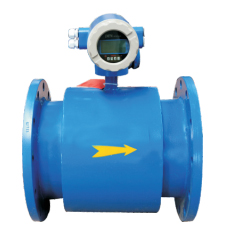
The ADMAG AE (SE) series electromagnetic flowmeters are typically equipped with a display panel featuring a 6-digit LCD, three buttons, and status indicator lights. All parameters, such as display mode, display unit, and range, can be set using the combination of the SET, SHIFT, and INC buttons. For specific settings, refer to the electromagnetic flowmeter's user manual.
2.2.2 BTSmart Terminal Setting
Instruments with intelligent communication capabilities can communicate with smart terminals. The smart terminals from Huanneng include models such asBT100 andBT200, collectively referred to asBT smart terminals. They use theBRAIN protocol, superimposing a±2mA.2.4kHz modulated signal onto the4–20mA analog signal for transmission. Since the modulated signal is AC, its superimposition does not affect the analog signal value.
There are two ways to connect the BT smart terminal to the flowmeter: one is to connect directly to the BT terminals under the flowmeter's end cover, which is suitable for on-site commissioning or when the flowmeter does not have intelligent communication capability; the other is to connect to the 4–20 mA DC signal line. The BT smart terminal can be connected at any point along the signal line from the control cabinet to the flowmeter, with a maximum distance of up to 2 km, as long as the total loop resistance is between 250 and 750 Ω, reliable communication is ensured. This method allows operators to configure and monitor the flowmeter from the control room without going to the field, making it the most commonly used approach.
The BT smart terminal uses a menu-driven operation, allowing real-time display and modification of various flowmeter parameters. Its basic operations include:
(1) Flowmeter self-check: Before any flowmeter is used or when a fault occurs, a self-check should be performed first. Using the self-check function helps understand the flowmeter's status, identify the fault's nature and scope, and facilitate repair and maintenance. Only instruments that pass the self-check can operate normally.
(2) Range adjustment: Before use and after a period of operation, the zero point and range must be calibrated to ensure that the flowmeter outputs 20 mA for the maximum instantaneous flow rate. With no flow, the output should be 4 mA, providing a 4–20 mA signal proportional to the flow, reducing measurement and conversion errors.
(3) Display mode setting: The display mode can be configured as needed, such as the number of digits, units, instantaneous or total flow, and whether to show the value or its percentage. Users can select based on their requirements.
(4) Alarm setting: Alarm current levels, alarm output types, and alarm states can be preset to alert operators promptly in case of flowmeter malfunction, preventing further escalation of issues.
(5) Other settings: Operators can also set the time constant of the flowmeter, dampen pulsating flow, or reverse the flow direction, depending on actual conditions.
If you need more detailed information, please call us at: 0591-28082552 or contact QQ: 2187169532
FuzhouDayu Electronics, we are dedicated to serving you!